Product
One export, four things you can check.
A read-only export of your custom code becomes an evidence graph, a cited catalogue generated without AI, a web app in English and Spanish, and Ask AI, which answers with numbered evidence. What static analysis cannot resolve is listed as an unresolved point, never guessed.
Four outputs
What one read-only export becomes.
Each output carries its evidence. One example tag per output, taken from our synthetic demo system.
01
Evidence graph
Every relationship points to the line of code or the configuration row that proves it, and stores file, line and confidence. What cannot be resolved is listed, not forced into the graph.
Example
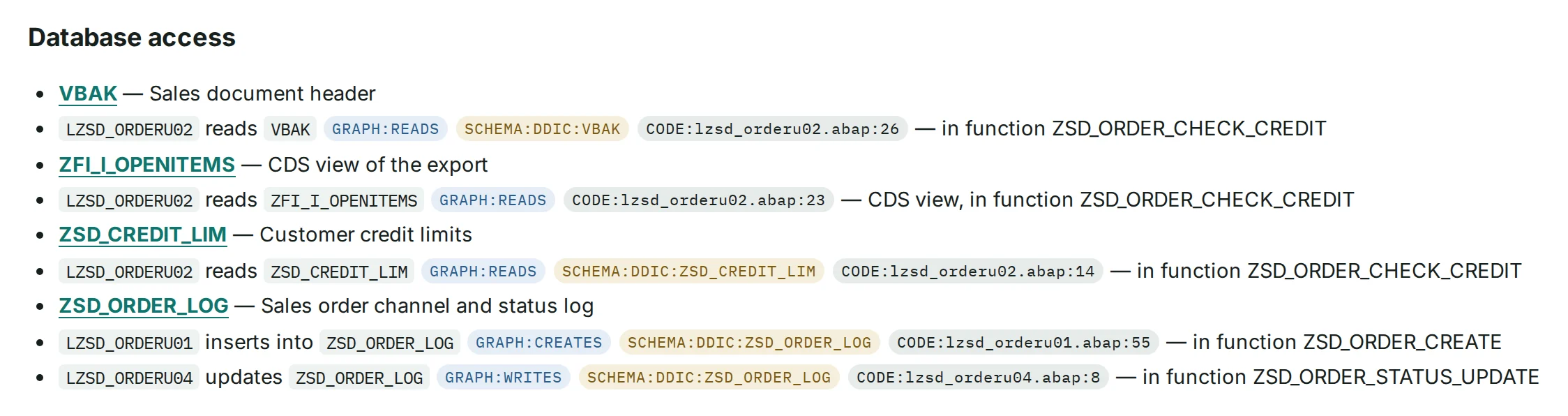
GRAPH:CREATES
A recorded relationship:
LZSD_ORDERU01inserts intoZSD_ORDER_LOG.02
Cited catalogue
One page per object, generated without AI. Every factual line carries a citation, and a deterministic citation auditor re-checks every tag.
Example
CODE:
lzsd_orderu01 .abap:55 The exact line of the source, numbered as in the ABAP editor (SE80).
03
Web app
Ten views in English and Spanish, from a business-area map down to a single statement. Every page requires sign-in.
Example
EXPORT:
cg_transactions .tsv:3 A row of the exported transaction list, opened in a side panel.
04
Ask AI
Questions in plain language. The answer cites numbered evidence items that the system produced, and cannot add evidence of its own. Off by default.
Example
E1
An evidence item, re-checked by the citation auditor and linked to its source line.
Inside the web app
Ten views, from a business-area map down to a single statement.
In the order the app shows them, in English or Spanish. After them: the object pages, the catalogue and the Validation Packages, plus a note on the MCP server.
View 1 of 10
Overview
A dashboard of counts for the documented system.
- Lines analyzed, objects, tables, relationships with evidence and citations verified, counted on one screen.
- Object search, a light and a dark theme, and an EN | ES switch in the header.
- Every page and API requires sign-in. Accounts are created by an administrator; there is no self-registration.
View 2 of 10
Landscape
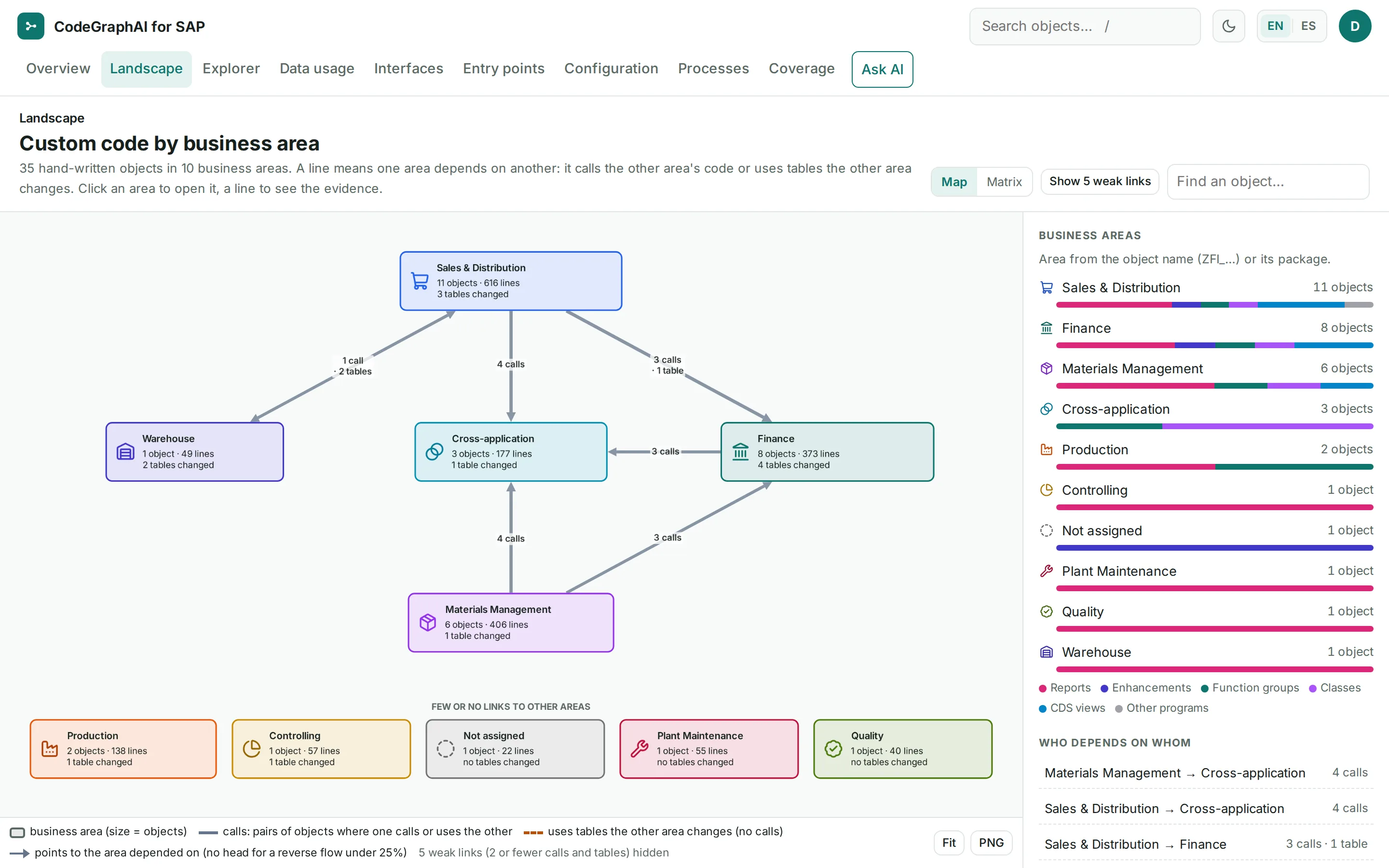
Readable maps, not hairballs. A whole system is never drawn as one tangled graph.
- Custom code by business area, then one area, then one object with “Impact if changed”.
- Each area shows what starts it, which other areas it calls, and which tables it reads and changes.
- Graphs download as images for your own documents.
View 3 of 10
Explorer
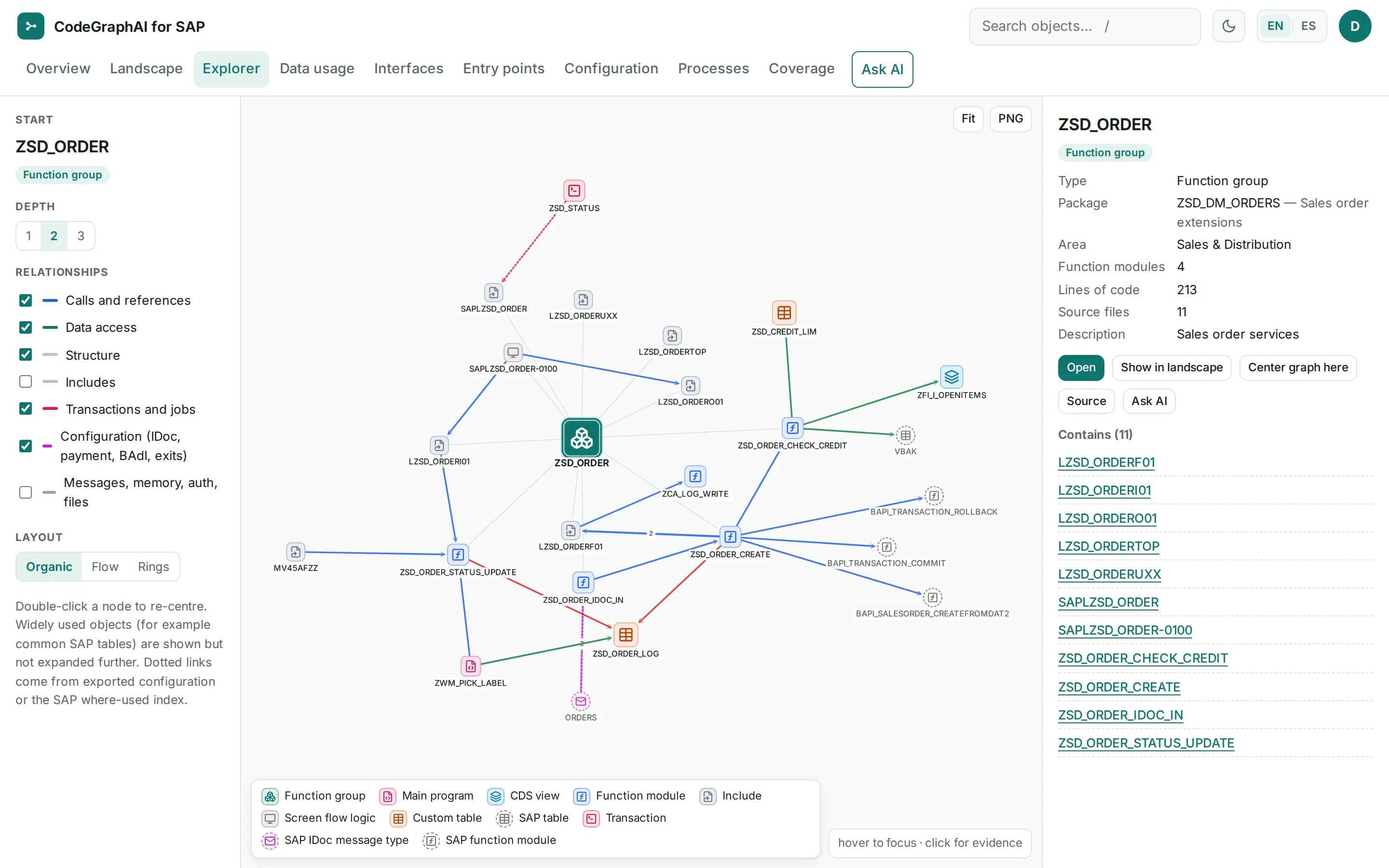
The evidence graph, one object at a time.
- A graph explorer of objects and their relationships, with relationship filters and a detail panel.
- Every relationship stores file, line and confidence.
- Each one is labeled with how it was established: resolved against the export or the SAP where-used index, taken from configuration or the dictionary, or matched by name only.
View 4 of 10
Data usage
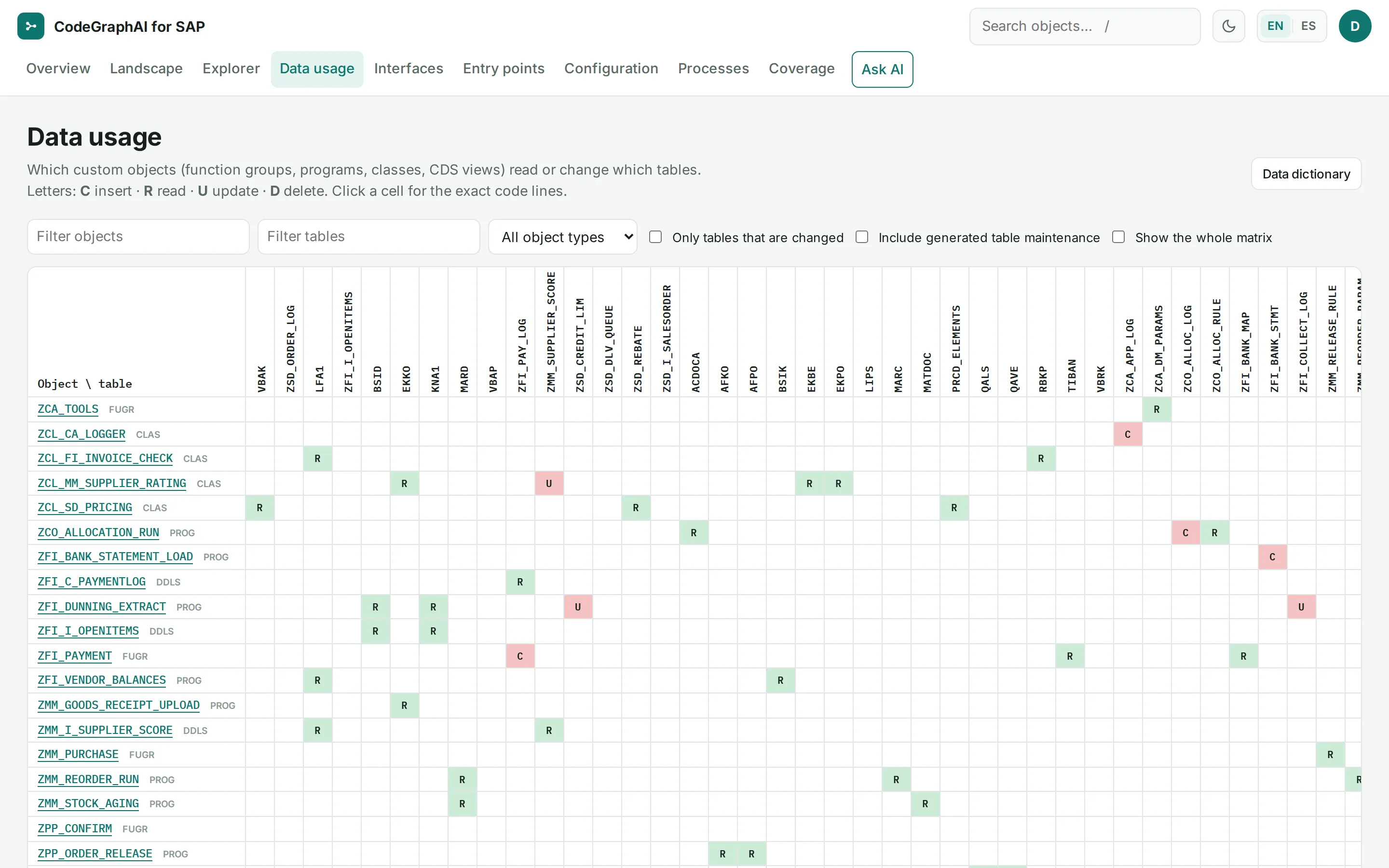
Who reads and changes each table.
- A matrix of which custom objects insert, read, update or delete which tables.
- Click a cell for the exact code lines.
- The authorization objects the code checks are documented too.
View 5 of 10
Interfaces
Channel families in plain language.
- Grouped by what they do: “Leaves the SAP system”, “Runs later”, “Posts into SAP standard” and “Hidden coupling”.
- Classified by channel: IDoc, RFC, BAPI, batch input (BDC), update task, HTTP, file, shared memory, payment and BAdI.
- Each channel shows how many custom objects use it and how many code lines or exported rows support it, with a CSV download.

View 6 of 10
Entry points
Every way custom code is started.
- Transactions and what they start or maintain; background jobs and what they run.
- IDoc processing, payment formats and DMEE trees, BAdI and CMOD implementations, user exits, table maintenance dialogs, screens, SUBMIT and CALL TRANSACTION.
- SAP code that calls your function modules, references your classes or includes your user-exit includes, from the SAP where-used index.
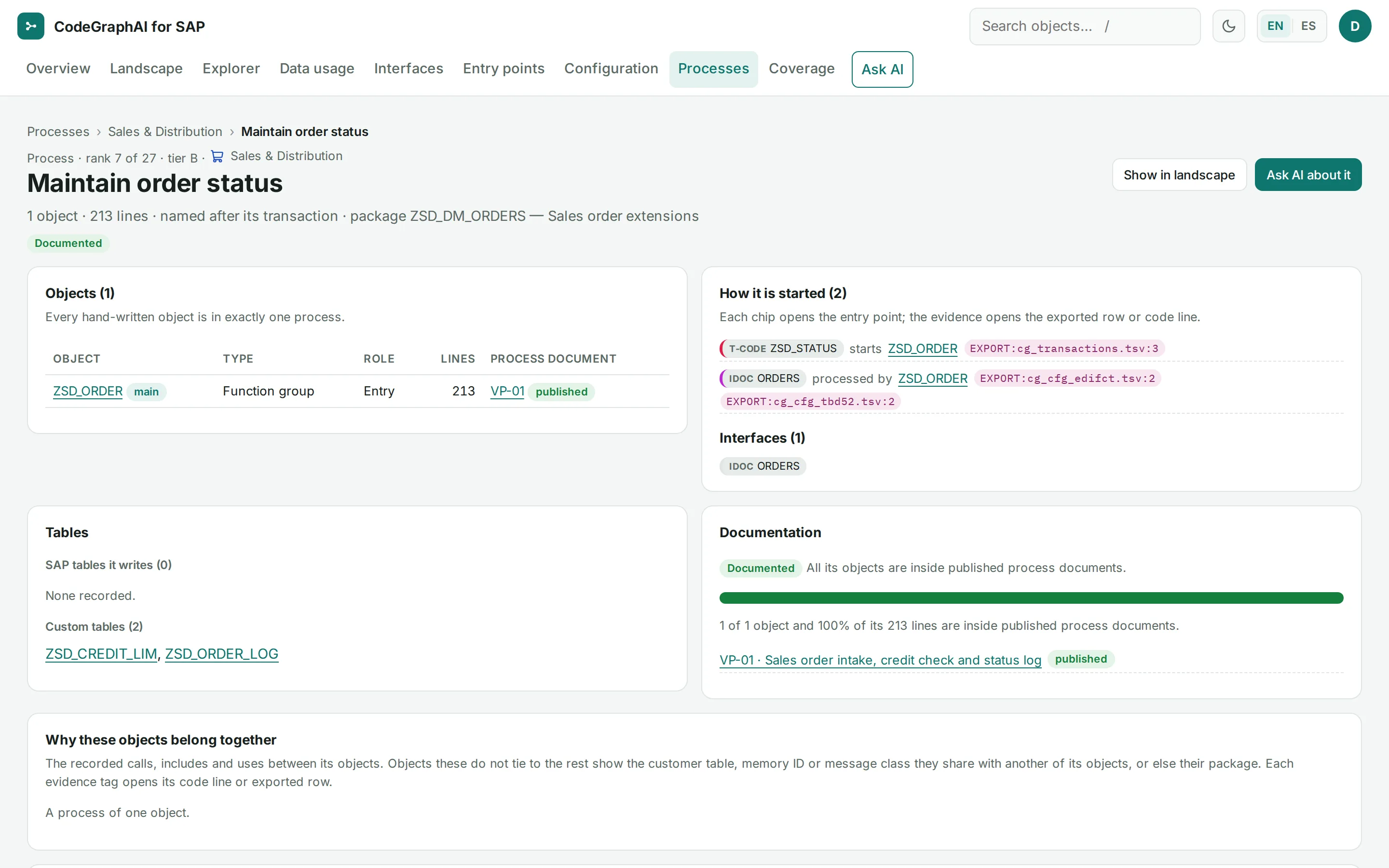
View 7 of 10
Configuration
Configuration, connected to the code it runs.
- IDoc message types, linked to the function modules that process them.
- Payment methods, linked to payment medium formats, DMEE trees and the function modules they call.
- BAdI implementations (classic and new), CMOD projects, table maintenance dialogs and the SAP modification log.
Catalogue page · function group ZSD_ORDER · How it is started
Message type
ORDERSis processed byZSD_ORDER_IDOC_INGRAPH:PROCESSED_BYchecked EXPORT:cg_cfg_edifct checked — IDoc type.tsv:2 ORDERS05, inboundProcess code
ZORDruns the function module registered for message typeORDERS:ZSD_ORDER_IDOC_INGRAPH:PROCESSED_BYchecked EXPORT:cg_cfg_tbd52 checked EXPORT:.tsv:2 cg_cfg_edifct checked — inbound, partner profiles (cg_cfg_edp21.tsv) are not in the export INFERRED:message type from the function module's registration, not from a partner profile.tsv:2
| FCTNAM | IDOCTYP | MESTYP | DIRECT |
|---|---|---|---|
| ZSD_ORDER_IDOC_IN | ORDERS05 | ORDERS | 2 |
View 8 of 10
Processes
The process map, plus the process documents.
- Custom code is grouped into processes by a deterministic algorithm, with no AI. Every hand-written object belongs to exactly one process.
- Names come from texts recorded in SAP, never invented. The grouping is labeled as a proposal, not a statement of business purpose.
- Ranked into tiers A, B and C, each with a documentation status: Documented, Partly documented or Not yet documented.
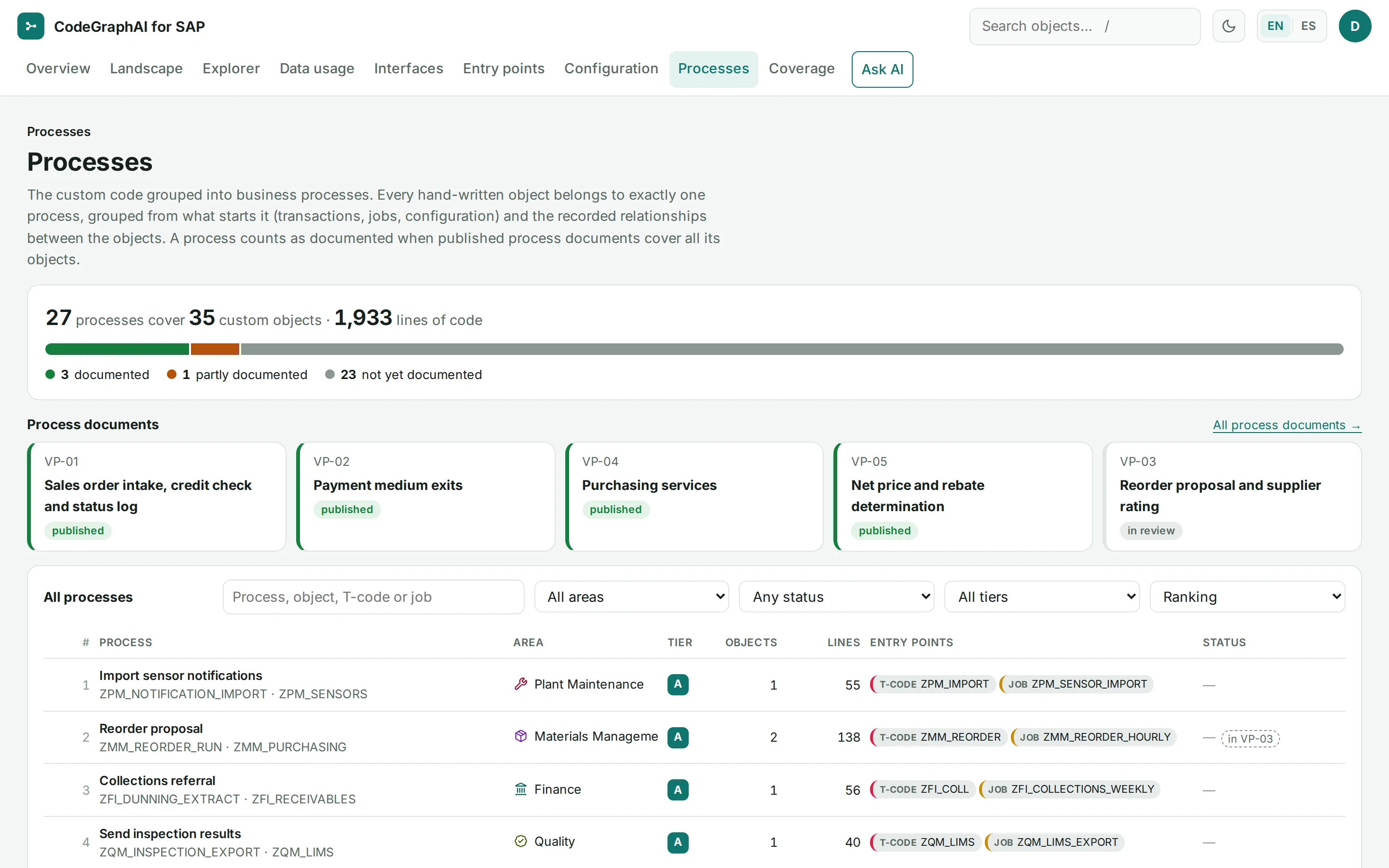
View 9 of 10
Coverage
The unresolved points, listed.
- Dynamic calls, dynamic SQL and targets outside the export are listed, never forced into the graph.
- “No code updates this table” is written only after checking, and says what stays invisible.
- A coverage register counts what was documented against what was exported.
Stated limit: Forms, Web Dynpro, OData services and workflows are inventoried, not documented in depth. The coverage register states which object types are documented in depth.
Illustration · not a recorded answer
Not resolved by static analysis
| Kind, What it means | Where | Evidence |
|---|---|---|
dyn call functionCALL FUNCTION with a computed name | ZWM_PICK_LABEL | CODE: |
void function modulefunction module called but not found in the export | ZMM_PURCHASE(ZSRM_PO_NOTIFY) | CODE: |
dyn file pathfile path computed at run time | ZFI_BANK_STATEMENT_LOAD | CODE: |
Kind:
dyn call functionWhat it means: CALL FUNCTION with a computed name
Where:
ZWM_PICK_LABELEvidence: CODE:
zwm_pick_label .abap:32 Kind:
void function moduleWhat it means: function module called but not found in the export
Where:
ZMM_PURCHASE(ZSRM_PO_NOTIFY)Evidence: CODE:
lzmm_purchaseu03 .abap:17 Kind:
dyn file pathWhat it means: file path computed at run time
Where:
ZFI_BANK_STATEMENT_LOADEvidence: CODE:
zfi_bank_statement_load .abap:24
INFERREDAn unresolved point is never guessed: the statement stays listed with its line, so a reader can check it.
View 10 of 10
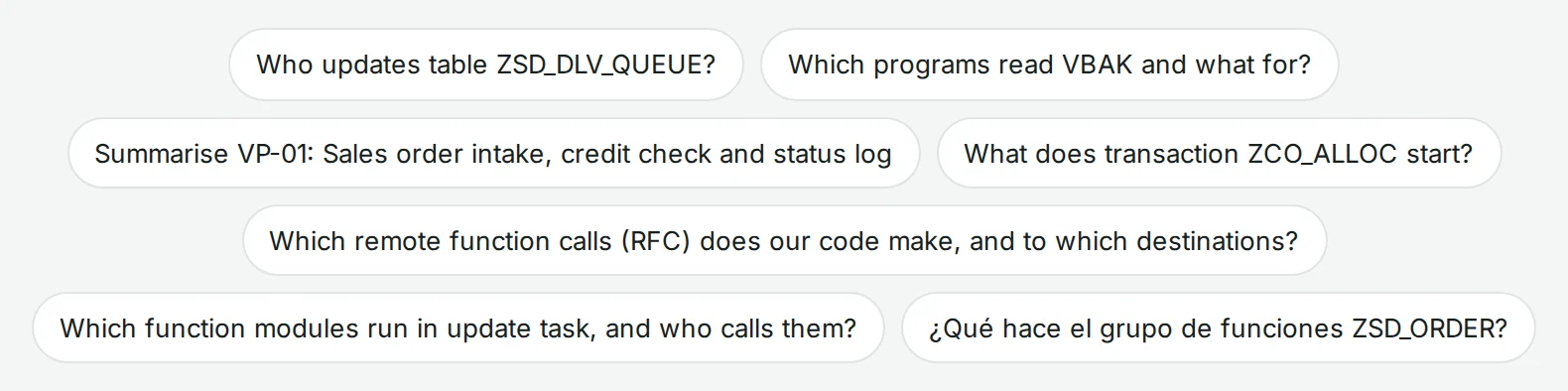
Ask AI
Plain-language questions, numbered evidence.
- Ask AI cites numbered evidence and cannot add evidence of its own.
- Each evidence item is re-checked by the citation auditor and linked to its source line; an answer with no evidence is labeled “unverified”.
- Ask in any language; the answer comes in English or Spanish.
Answers are generated and may be incomplete; the linked code is the reference.
The app says so too.
Stated limit: Ask AI uses OpenAI, and each request is sent with the provider’s do-not-store setting. What the provider itself retains, for example for abuse monitoring, is set by its own terms; ask us. It is off by default and stays off until your authorization is recorded. Every cited statement comes from your documentation. General SAP background, if any, is labeled and has no citations.
A page for every object
One page per module, function module, transaction, job and table.
- Table pages: the fields, and who reads or changes the table.
- Function modules with their call trees.
- A source viewer that highlights the cited line, for ABAP, CDS and screen flow logic; a side panel opens each cited exported row.
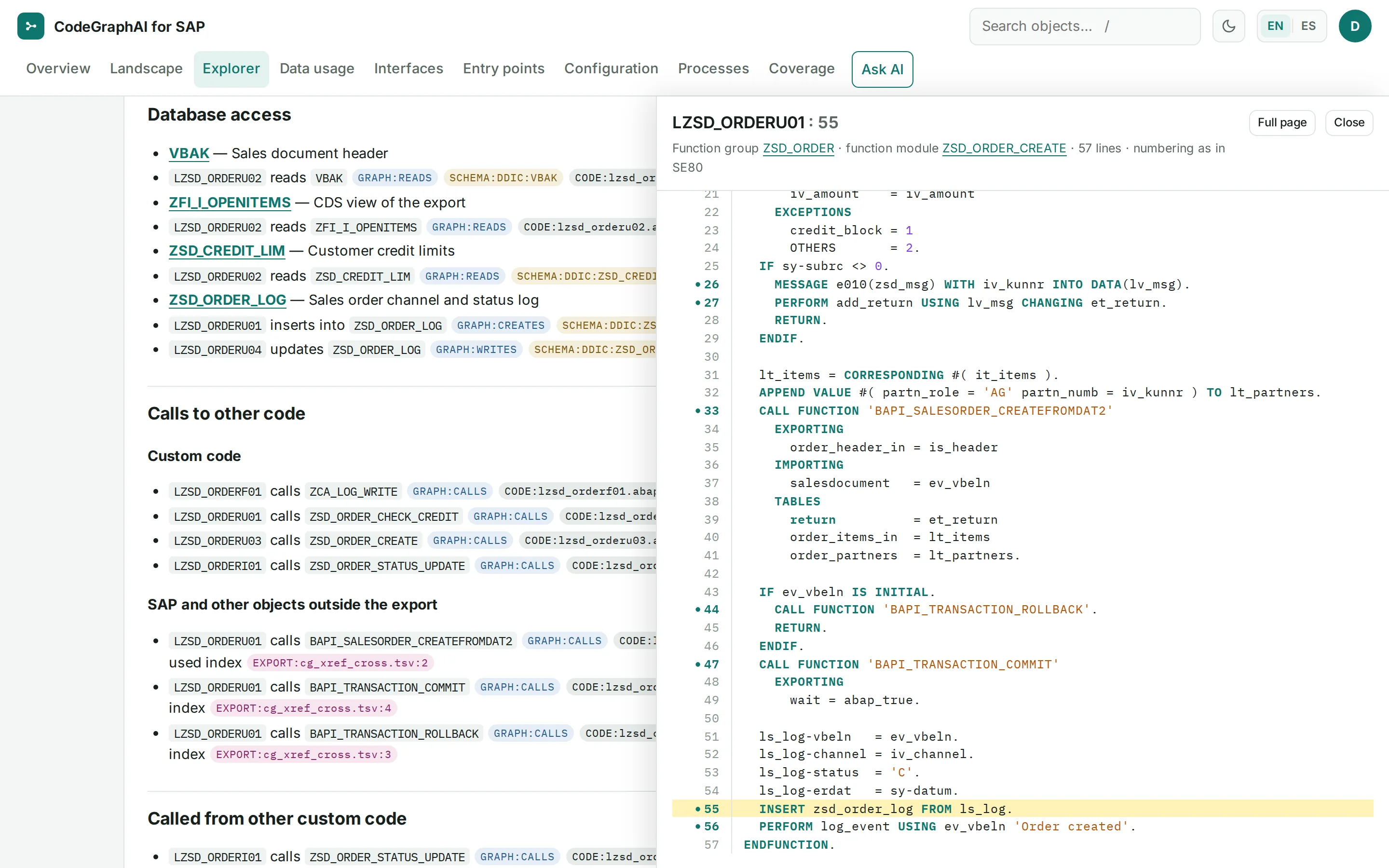
LZSD_ORDERU01 with line 55 highlighted, next to the documentation that cites it. Screens from a synthetic demo system. Full size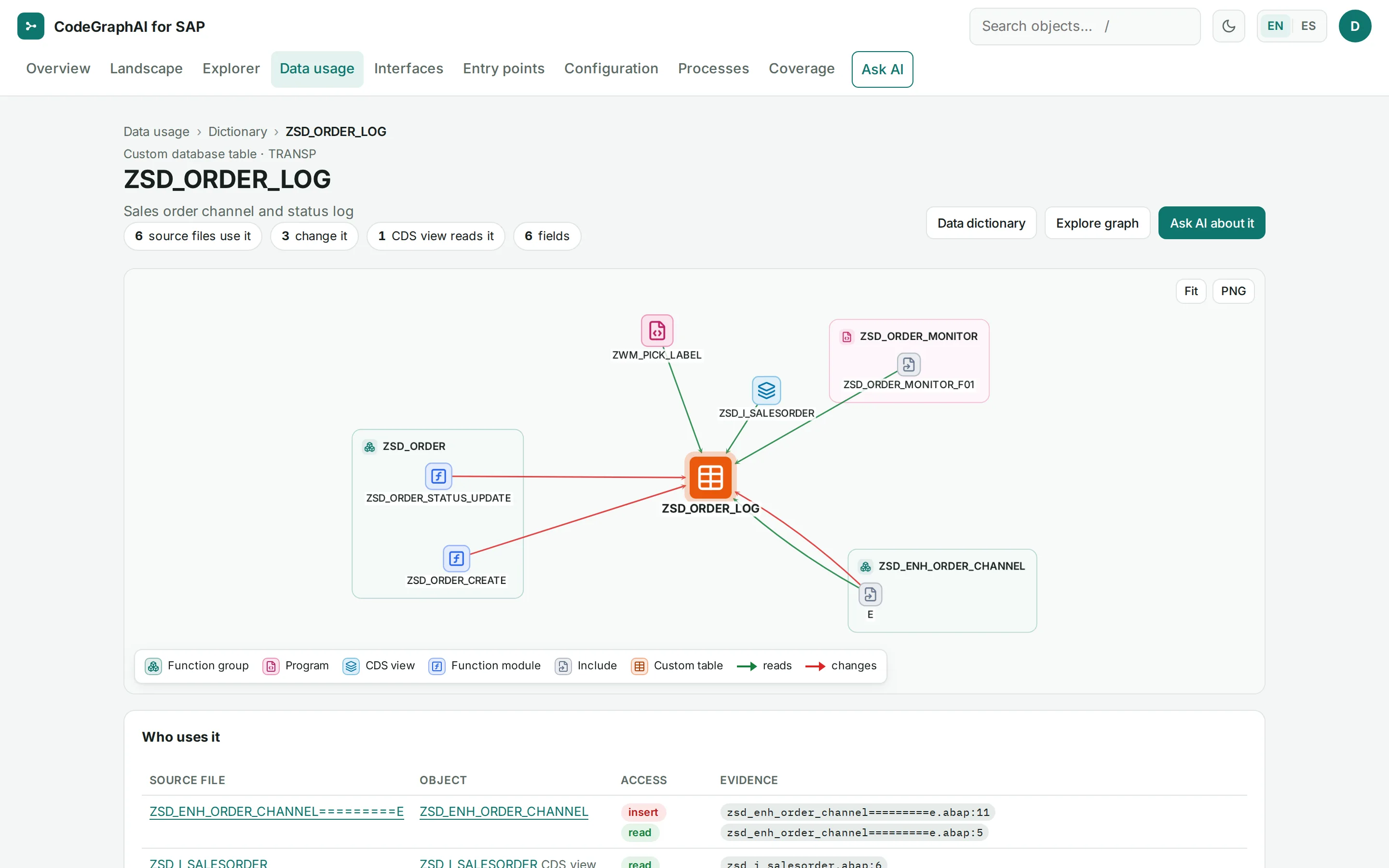
ZSD_ORDER_LOG, with the code line for each use, and its fields. Screens from a synthetic demo system. Full size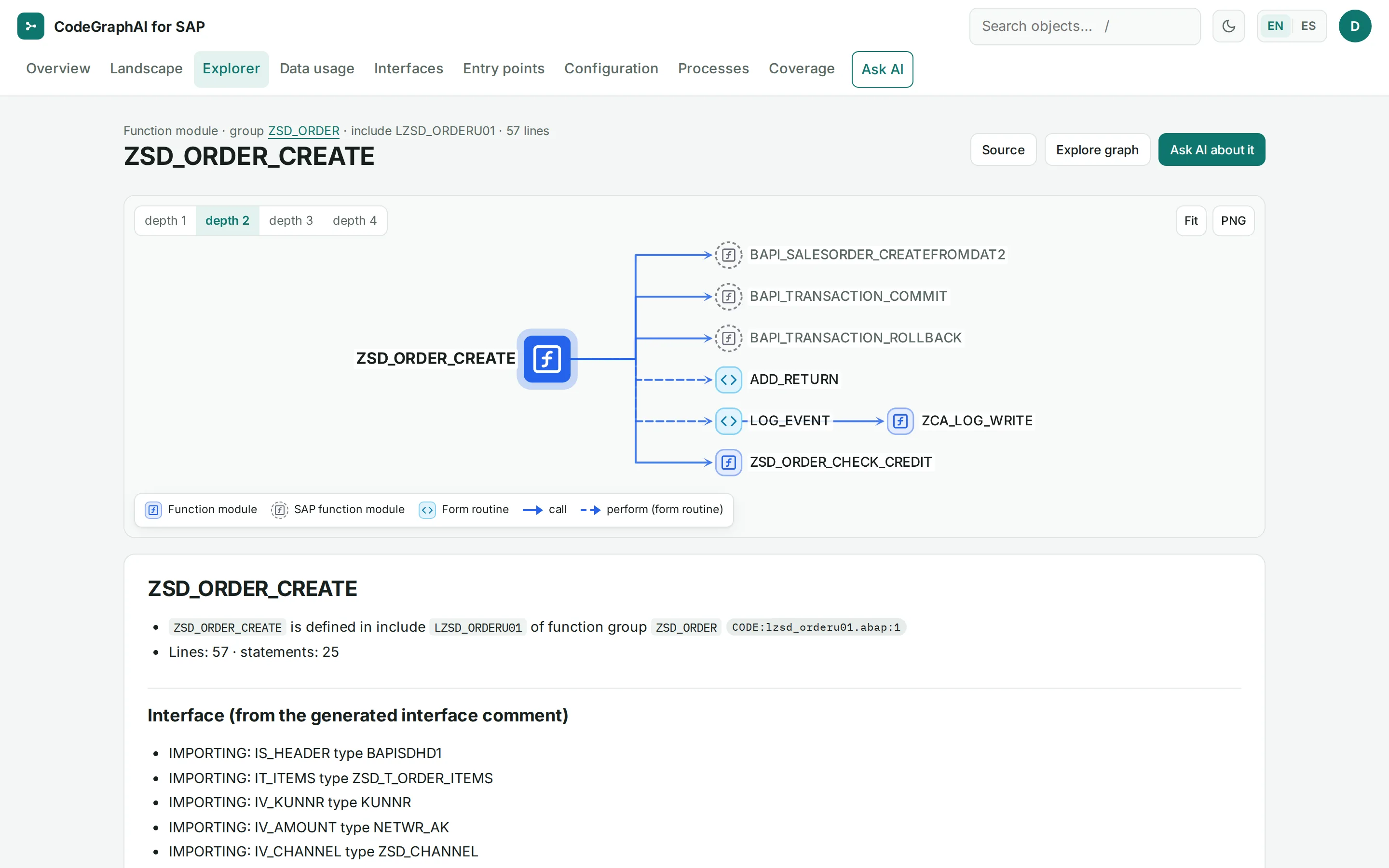
ZSD_ORDER_CREATE: the call tree to the BAPIs, form routines and function modules it calls, above its interface. Screens from a synthetic demo system. Full sizeCatalogue
One page per object, generated without AI.
- Every factual line is cited. The catalogue states what the code and the configuration do and where; it never states business purpose.
- Every module page is built the same way: its structure, how it is started, its database access, the code it calls and the code that calls it, with every factual line cited.
- Plain Markdown pages with wiki-links, which can also be built as a static website for offline reading. Ask us whether the files are part of your engagement.

LZSD_ORDERU01 inserts into and LZSD_ORDERU04 updates ZSD_ORDER_LOG, each followed by its GRAPH, SCHEMA and CODE citations. Screens from a synthetic demo system. Full sizeValidation Packages
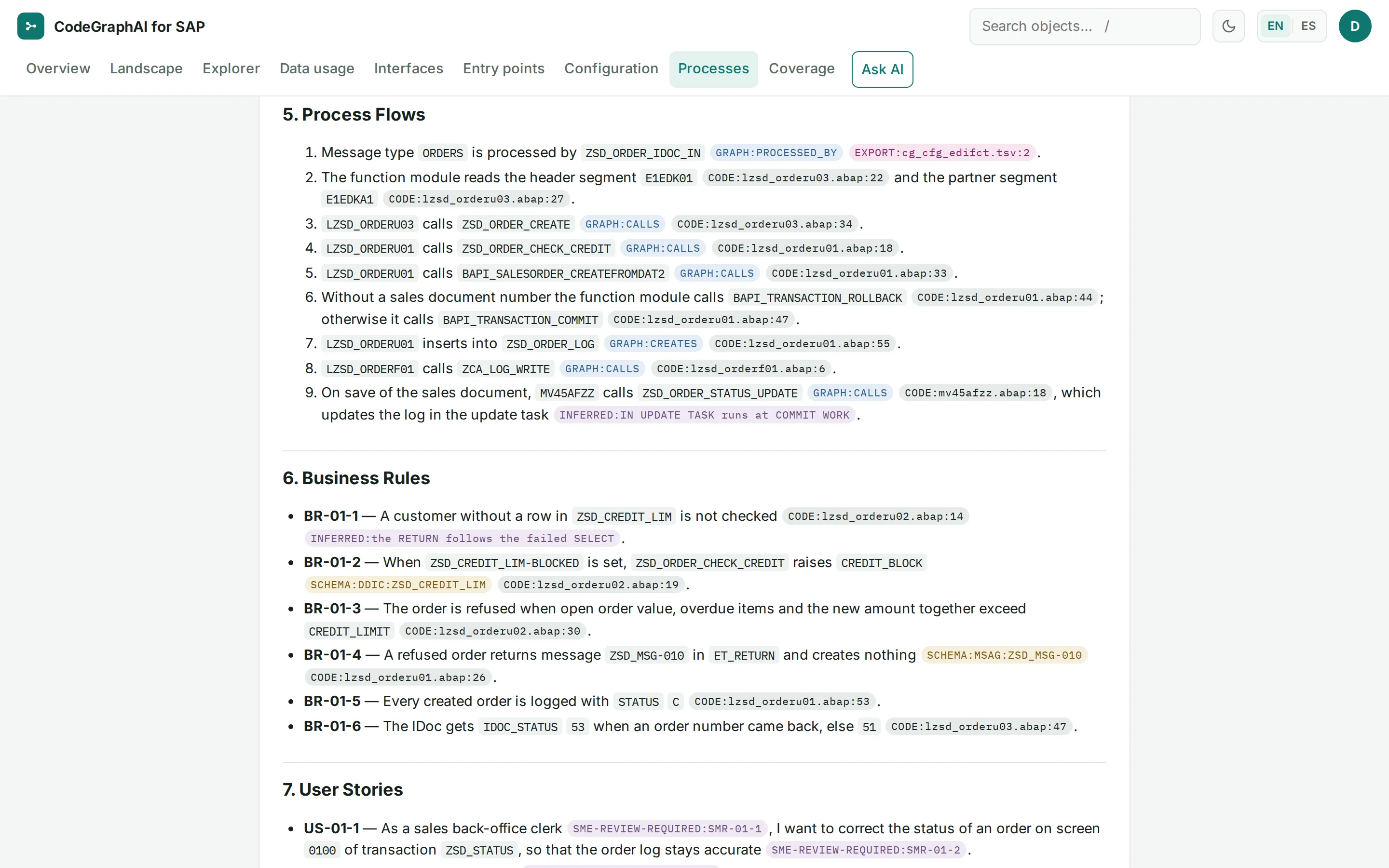
Each process document (Validation Package) describes one business domain end to end. It is written from the code evidence, then challenged by independent reviewer models and machine-checked citation by citation. The final step is sign-off by your subject-matter expert, which publishes it.
Three gates, then your expert
Documentation Validator Zero unresolvable table or field references.
Validation Triad Independent Defender and Challenger reviewer models argue; a Judge model issues binding corrections.
Citation Auditor Every citation tag must pass.
Expert sign-off Your subject-matter expert confirms the points marked SME-REVIEW-REQUIRED and signs off, which publishes the document.
The runner cannot skip or waive a gate.
Eight fixed sections
- Overview
- Program inventory
- Screen descriptions
- CRUD matrix
- Process flows
- Business rules
- User stories
- Validation checklist
Status shown to readers
- Machine-verified, awaiting expert sign-off
- Signed off by your subject-matter expert and published
Product: The roles that write and review Validation Packages run on Anthropic Claude or on OpenAI. Every run needs a recorded authorization naming an approver. Batches run within a budget that you approve.
Stated limit: Validation Packages need AI runs and expert sign-off, so they take longer than the automated documentation.
MCP server
A read-only server, built on the open Model Context Protocol (MCP) and used with Claude Code, lets an AI assistant query the same documentation, with the same citation tags. The server itself makes no writes and no network calls. It answers in English only. Ask us whether MCP access is part of your engagement, and how it is authorized.
English and Spanish
Two languages, one method.
Everything a reader sees is available in English and in neutral Latin-American Spanish: the web app, the catalogue, the process map and Ask AI answers. The Spanish catalogue has the same pages, links and citation tags, and is audited the same way.
Translated
- Web app, sign-in pages and messages
- Catalogue and process map
- Ask AI answers and their evidence lines
- Validation Packages, as a verified translation
Never translated
- SAP object names and code
- Table and field names
- Citation tags
- Texts exported from SAP
Stated limit: Validation Packages are written and gated in English. The Spanish version is a machine translation made with OpenAI, served with a “verified” badge only after a tool confirms that every citation, code span, number and table is unchanged and a reviewer model checks the meaning.
A guided demo with our team: the web app, the evidence graph and a cited catalogue page.
or write to hello@codegraphai.com