Every relationship
Graph verifier
Replays every relationship against its cited source line or exported row.
How it works
A read-only ABAP report exports your custom code and the context around it. From that export, CodeGraphAI builds an evidence graph, re-checks every relationship and every citation, and generates the documentation. This page walks through each step: what it produces, and where its limits are.
01The export
It reads code, dictionary definitions and configuration. It reads no transactional data and no user names, and it changes nothing: its only output is the export files, written to a directory you choose.
| What | In detail |
|---|---|
| Custom source code | Programs and includes (reports, module pools, user-exit includes), classes and interfaces (every include), function groups and their function modules, enhancement implementations and CDS view sources. |
| ABAP Dictionary definitions | The structure, not the table contents: customer tables, views, structures, appends, data elements, domains with fixed values and table types. Also the definitions of the SAP tables your code uses. |
| The SAP where-used index | Both directions: who calls your code from SAP, and what your code references. |
| Transactions | Customer transaction codes with their program, screen, parameters and text. |
| Screens | Flow logic and field names. |
| Background jobs that run customer programs | Job name, step, program, variant name, number of runs in the period (default 90 days), last run date, periodic flag and statuses. No user names. |
| Process configuration (customizing) | IDoc process codes; IDoc partner profiles (included by default; one checkbox leaves them out, see the stated limit below); payment methods and payment medium formats; customer DMEE trees; CMOD projects; classic and new BAdI implementations; table maintenance dialogs (SM30); the SAP modification log (names of modified SAP objects only). |
| Texts | Object, package and message texts: in the selected language, then the master language, then English. |
| Inventory | Every customer object of the selection, of all object types, flagged with whether its content was exported. |
Stated limit: IDoc partner profiles are included by default and contain partner numbers (customer, vendor and bank numbers). One checkbox, “Include IDoc partner profiles”, leaves them out. The documentation never writes partner numbers. An optional field, “Extra config tables (content)”, reads only the tables you add to it; it is empty by default.
The one exception
The user-exit includes that you list on the selection screen are read, because they hold customer code inside SAP frames. In the synthetic demo system, the user-exit include MV45AFZZ is documented like any other custom code:
MV45AFZZ calls ZSD_ORDER_STATUS_UPDATE GRAPH:CALLS CODE:
| Authorization object | Access |
|---|---|
S_DEVELOP | Display |
S_TABU_NAM / S_TABU_DIS | Display |
S_DATASET | Write, for the output directory |
S_GUI | Only for a download to a PC folder |
Product: Tables the user may not display are skipped and logged.
$TMP), so no transport is needed.Z*, Y*). You can add your own namespace (for example /ABC/*) and narrow the selection by package.02The evidence graph
One relationship per evidence site, stored with how it was detected, the file, the line and a confidence tier. Each one is re-verified automatically.
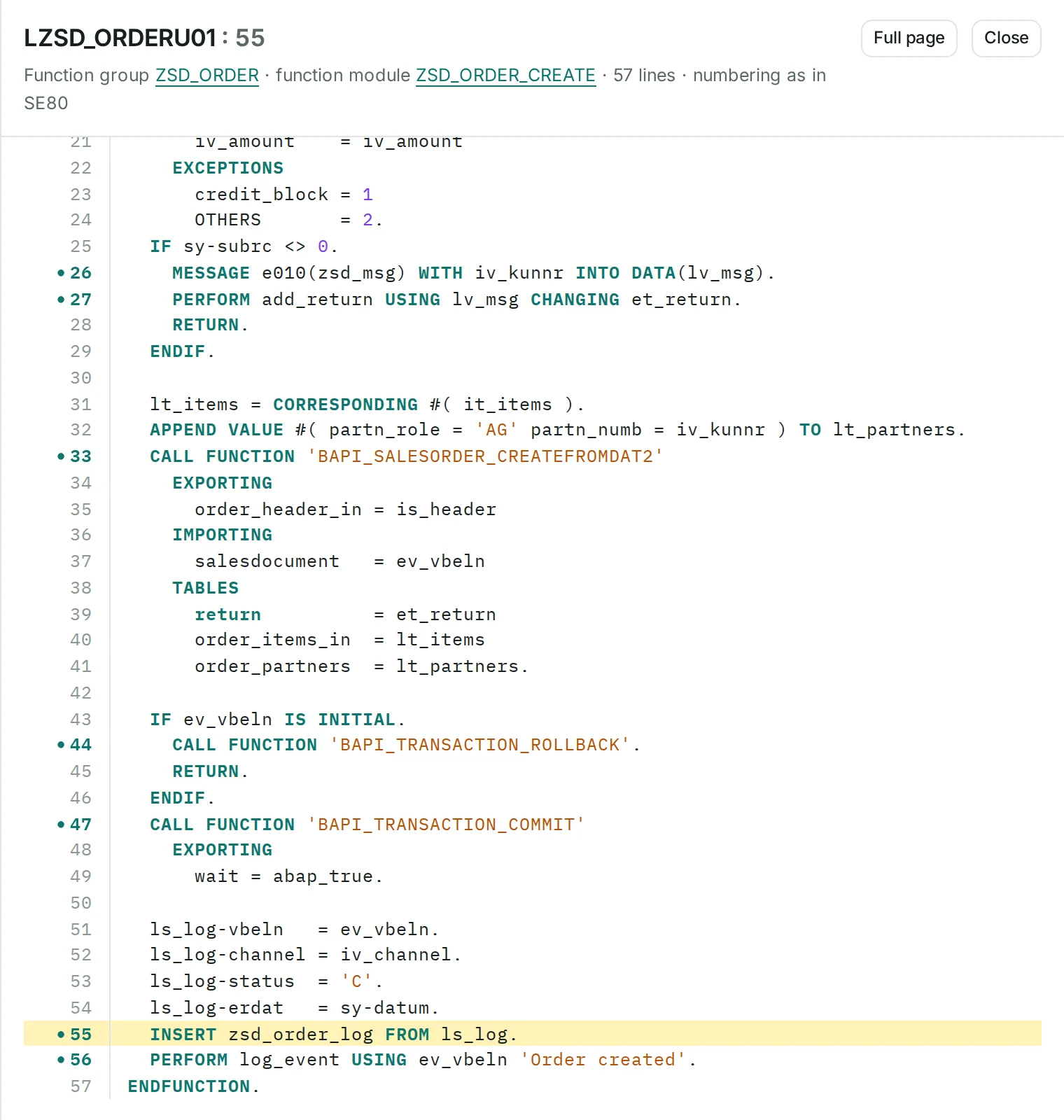
LZSD_ORDERU01 calls BAPI_SALESORDER_CREATEFROMDAT2 GRAPH:CALLS CODE:
The code line
33CALL FUNCTION 'BAPI_SALESORDER_CREATEFROMDAT2'34 EXPORTING35 order_header_in = is_header
The where-used row
cg_xref_cross.tsv, line 2
Stored with every relationshiphow it was detectedfilelineconfidence tier
| Confidence tier | How the relationship was established |
|---|---|
| Resolved | Resolved against the export or the SAP where-used index. |
| Configuration or dictionary | Taken from configuration or the ABAP Dictionary. |
| Name only | Matched by name only. |
What static analysis cannot resolve appears as an unresolved point in Coverage:
Unresolved point
CALL FUNCTION gv_fm in ZWM_PICK_LABEL: the function name is computed at run time. Listed in Coverage, never guessed.
CODE:
A sentence such as “no code updates this table” is written only after checking, and it always states what the check cannot see.
Checked first
What stays invisible, for example
The evidence graph, drawn
STARTSEXPORT:
CALLS, IN UPDATE TASKCODE:
Unresolved point
CALL FUNCTION gv_fm: the function name is computed at run time. Listed in Coverage, never guessed.
CODE:
WRITESGRAPH:WRITESCODE:
Lines 8 to 10 of include LZSD_ORDERU04
8UPDATE zsd_order_log SET status = iv_status9 aedat = sy-datum10 WHERE vbeln = iv_vbeln.
LZSD_ORDERU04 updates ZSD_ORDER_LOG
GRAPH:WRITESSCHEMA:DDIC:
CALL FUNCTION gv_fm): listed, never guessed03Verification
Two checks run on what was built, and there is no AI in this step. The web app shows the citation check next to each citation.
Every relationship
Replays every relationship against its cited source line or exported row.
Every tag
Re-checks every tag on every catalogue page. It is a deterministic script, not an AI.
Next to each citation
The app shows the result of the check next to each citation: checked, or a warning.
Five tags and one marker, each with one meaning.
Stated limit: Re-verification proves that each citation points to real evidence that matches it. It does not prove that a business interpretation is correct. That is why Validation Packages end with sign-off by your subject-matter expert.
04Pilot figures
Automated analysis of a productive SAP S/4HANA system.Note 1 The notes under the figures say what each one covers, and what it does not.
313,202
lines of ABAP analyzed
2,387
custom objects inventoriedNote 2
13,480
relationships with verified evidenceNote 3
0
failures when re-verifying each relationshipNote 4
1 day
from export to documentationNote 5
| 12,739 | from a line of ABAP / CDS code | cited as CODE |
|---|---|---|
| 535 | from an exported configuration row | cited as EXPORT |
| 206 | from the SAP where-used index | cited as EXPORT |
| 13,480 | relationships, 0 failures |
Plus: 14,571 ABAP Dictionary facts (tables and fields).
05What it produces
The catalogue and the process map are generated without AI. Validation Packages and Ask AI use AI, only with your recorded authorization. The roles that write and review Validation Packages run on Anthropic Claude or on OpenAI; the verified Spanish translations of Validation Packages, and Ask AI, use OpenAI.
Built without AI
Built without AI
AI, with your recorded approval
AI, off by default
Answers are generated and may be incomplete; the linked code is the reference.
The app says so too.
06Refresh
There is no live connection to SAP. A refresh is a new export, built and verified separately before it goes live.
After a release, you run the same read-only report and hand over the new archive.
The graph, the catalogue and the process map are regenerated, and every citation is re-audited. The new version is built and verified separately, in both languages.
The previous version is archived and can be rolled back. User accounts, approvals and Validation Packages are kept across refreshes.
Stated limit: Validation Packages are not rewritten automatically. A Validation Package that is regenerated must pass the gates again.
The subscription covers this: refresh after every release, AI included, plus support.
07The CodeGraph method
CodeGraphAI for SAP is built on CodeGraph, a technology-agnostic method for evidence-based documentation of software systems.
Source ingestion. The evidence graph, with the evidence recorded on every relationship.
Domain documentation. Validation Packages with three gates: Documentation Validator, Validation Triad (Defender, Challenger and Judge) and Citation Auditor.
Reference layer. For SAP, the cited catalogue: one page per object, generated without AI.
Process discovery. For SAP, the process map: custom code grouped into business processes, without AI.
Vault assembly. For SAP, the catalogue assembled as plain Markdown pages with wiki-links, which can also be built as a static website.
Method: “CodeGraph” on its own names only the method. The product is CodeGraphAI for SAP.
| The method needs | For SAP |
|---|---|
| A source export with stable line numbers | The read-only report, which keeps SE80 numbering |
| A parser or extractor for the language, emitting objects and relationships with source, file, line and confidence | An ABAP extractor plus a graph builder |
| Schema definitions of the database | The ABAP Dictionary |
| Optionally, a compiler cross-reference for the most reliable relationships | The SAP where-used index |
| The configuration or wiring that starts code | Transactions, jobs, IDoc, payment, BAdI and CMOD |
| A graph store, a deterministic cited catalogue generator, a graph verifier and a citation auditor | The evidence graph, the catalogue, the verifier and the auditor described on this page |
| AI roles with gates for the business documents, plus human expert review | Validation Packages and sign-off by your subject-matter expert |
Beyond SAP. Today SAP is the method’s only implementation. Have another technology? The same method applies to any codebase once a parser for its language is built.
or write to hello@codegraphai.com