
Process and custom code documentation for SAP
How your business runs on SAP, documented with proof.
One read-only export of your SAP system becomes documentation of how your processes run: what starts them, which tables they read and change, which interfaces they reach and which custom code carries them. Every factual line is cited. Your experts confirm the business purpose.
A catalogue page generated without AI from our synthetic demo system.
- Read-only export
- Evidence graph
- Cited catalogue
- Web app access
In short
Read-only
One export report, installed with no transport. No transactional data, no user names.
Cited
Every factual line carries a citation to the evidence behind it.
Verified
In the pilot: 13,480 relationships with verified evidence, and 0 failures when re-verifying each relationship.123
Confirmed
Process documents are published only when your subject-matter expert signs off.
Notes on the pilot figures
- 1
Pilot: a productive SAP S/4HANA system. Automated analysis, re-verified with no failures.
- 2
Each relationship stores file, line and confidence.
- 3
“0 failures” means every relationship re-checked against its cited line or row. It does not prove that a business interpretation is correct; that is what expert sign-off is for.

01The problem
Without documentation, every decision about a process is a guess.
Your processes run on SAP standard and on what your company built around it: custom code, configuration, jobs and interfaces. That second part is where the questions are.
The knowledge lives in a few heads.
Consultants leave, key users move on, and the documentation never existed or is out of date.
Every change is a risk.
“Who else writes this table?” or “What happens when this IDoc arrives?” costs days of analysis by a senior expert.
Big projects start blind.
SAP S/4HANA, clean core, an AMS switch or an audit all begin with a manual inventory.
Below: one sales order, stage by stage, with the evidence behind each step.
02Process discovery
Follow a sales order through the system.
Process discovery starts from what your SAP system already holds: the code, configuration, transactions and jobs behind each process. Below are six stages of a sales order in our synthetic demo system, each with the evidence behind it. Tags with a link open the exact line or row on our public sample pages.






Illustration: a scale model of a company’s world; the lime thread stands for the order’s route.
A sales order, from the inbound IDoc to the status update
Synthetic demo system
Stage 1 of 6
Order arrives
Inbound IDoc message type ORDERS is processed by ZSD_ORDER_IDOC_IN, which calls ZSD_ORDER_CREATE.
- GRAPH:PROCESSED_BY
- EXPORT:
cg_cfg_edifct .tsv:2 cg_cfg_edifct.tsv:2
- FCTNAM
- ZSD_ORDER_IDOC_IN
- IDOCTYP
- ORDERS05
- MESTYP
- ORDERS
- DIRECT
- 2
Synthetic demo systemShow line 2 of the exported file cg_cfg_edifct.tsv on the sample page
- CODE:
lzsd_orderu03 .abap:34 lzsd_orderu03.abap:34
CALL FUNCTION 'ZSD_ORDER_CREATE'Synthetic demo systemShow line 34 of LZSD_ORDERU03 on the sample page
Stage 2 of 6
Credit check
ZSD_ORDER_CREATE calls ZSD_
ORDER_ CHECK_ CREDIT, which reads ZSD_CREDIT_LIM (Customer credit limits). - CODE:
lzsd_orderu01 .abap:18 lzsd_orderu01.abap:18
CALL FUNCTION 'ZSD_ORDER_CHECK_CREDIT'Synthetic demo systemShow line 18 of LZSD_ORDERU01 on the sample page
- GRAPH:READS
- SCHEMA:DDIC:
ZSD_CREDIT_LIM - CODE:
lzsd_orderu02 .abap:14 lzsd_orderu02.abap:14
SELECT SINGLE * FROM zsd_credit_lim INTO ls_limitSynthetic demo systemShow line 14 of LZSD_ORDERU02 on the sample page
- CODE:
Stage 3 of 6
Order created
ZSD_ORDER_CREATE calls BAPI_
SALESORDER_ CREATEFROMDAT2. The SAP where-used index records the same call. - GRAPH:CALLS
- CODE:
lzsd_orderu01 .abap:33 lzsd_orderu01.abap:33
CALL FUNCTION 'BAPI_SALESORDER_CREATEFROMDAT2'Synthetic demo systemShow line 33 of LZSD_ORDERU01 on the sample page
- EXPORT:
cg_xref_cross .tsv:2 cg_xref_cross.tsv:2
- direction
- from_custom
- type
- F
- name
- BAPI_SALESORDER_CREATEFROMDAT2
- include
- LZSD_ORDERU01
Synthetic demo systemShow line 2 of the exported file cg_xref_cross.tsv on the sample page
Stage 4 of 6
Channel and status logged
ZSD_ORDER_CREATE inserts into ZSD_ORDER_LOG (Sales order channel and status log).
- GRAPH:CREATES
- SCHEMA:DDIC:
ZSD_ORDER_LOG - CODE:
lzsd_orderu01 .abap:55 lzsd_orderu01.abap:55
INSERT zsd_order_log FROM ls_log.Synthetic demo systemShow line 55 of LZSD_ORDERU01 on the sample page
Stage 5 of 6
Picking label printed
Transaction ZWM_LABEL (Print picking labels) starts ZWM_PICK_LABEL, which reads ZSD_ORDER_LOG.
- EXPORT:
cg_transactions .tsv:15 - CODE:
zwm_pick_label .abap:22 zwm_pick_label.abap:22
SELECT SINGLE channel FROM zsd_order_logSynthetic demo systemShow line 22 of ZWM_PICK_LABEL on the sample page
- EXPORT:
Stage 6 of 6
Status updated
ZSD_
ORDER_ STATUS_ UPDATE updates ZSD_ORDER_LOG. It is called in the update task from three places: the user-exit include MV45AFZZ, the screen of transaction ZSD_STATUS and ZWM_PICK_LABEL. - CODE:
lzsd_orderu04 .abap:8 lzsd_orderu04.abap:8
UPDATE zsd_order_log SET status = iv_statusSynthetic demo systemShow line 8 of LZSD_ORDERU04 on the sample page
- CODE:
mv45afzz .abap:18 mv45afzz.abap:18
CALL FUNCTION 'ZSD_ORDER_STATUS_UPDATE' IN UPDATE TASKSynthetic demo systemShow line 18 of MV45AFZZ on the sample page
- CODE:
lzsd_orderi01 .abap:4 lzsd_orderi01.abap:4
CALL FUNCTION 'ZSD_ORDER_STATUS_UPDATE' IN UPDATE TASKSynthetic demo systemShow line 4 of LZSD_ORDERI01 on the sample page
- CODE:
zwm_pick_label .abap:40 zwm_pick_label.abap:40
CALL FUNCTION 'ZSD_ORDER_STATUS_UPDATE' IN UPDATE TASKSynthetic demo systemShow line 40 of ZWM_PICK_LABEL on the sample page
- CODE:






Unresolved point
CALL FUNCTION gv_fm in ZWM_PICK_LABEL: the function name is computed at run time. Listed in Coverage, never guessed.
Illustration from our synthetic demo system. Each statement restates lines of its catalogue, generated without AI, with their citation tags. The stage names and their order are added for this page. Linked tags open the exact line or row on the sample pages. GRAPH tags name a recorded relationship and have no page of their own.
03Process flow
A process flow for every process.
In the web app, each process has its process flow: how it is started, each step in the order of the code, what it calls outside the process, the tables it uses and the interfaces it reaches. It is built from the evidence graph without AI, with a citation on every step. A layer shows its neighbouring processes: the ones it comes from and the ones it continues in.
IllustrationStage 5 of the route, opened as a process flow
The process flow behind stage 5: picking labels
Objects of this process Program ZWM_PICK_LABEL
- CODE:
lzsd_orderu01 .abap:55 lzsd_orderu01.abap:55
INSERT zsd_order_log FROM ls_log.Synthetic demo systemShow line 55 of LZSD_ORDERU01 on the sample page
- CODE:
zwm_pick_label .abap:22 zwm_pick_label.abap:22
SELECT SINGLE channel FROM zsd_order_logSynthetic demo systemShow line 22 of ZWM_PICK_LABEL on the sample page
Transaction ZWM_LABEL starts program ZWM_PICK_LABEL.
- EXPORT:
cg_transactions .tsv:15
Started byZWM_LABELTransaction · Print picking labels
- EXPORT:
ZWM_PICK_LABEL reads ZSD_ORDER_LOG.
- CODE:
zwm_pick_label .abap:22 zwm_pick_label.abap:22
SELECT SINGLE channel FROM zsd_order_logSynthetic demo systemShow line 22 of ZWM_PICK_LABEL on the sample page
DataZSD_ORDER_LOGTable
- CODE:
It calls a function module whose name is decided at run time (CALL FUNCTION gv_fm): an unresolved point, never guessed.
- CODE:
zwm_pick_label .abap:32 zwm_pick_label.abap:32
CALL FUNCTION gv_fmSynthetic demo systemShow line 32 of ZWM_PICK_LABEL in the sample source listing (shown there, not cited by that page)
Called outside the processgv_fmFunction module decided at run time
- CODE:
It calls ZSD_
ORDER_ STATUS_ UPDATE in the update task. - CODE:
zwm_pick_label .abap:40 zwm_pick_label.abap:40
CALL FUNCTION 'ZSD_ORDER_STATUS_UPDATE' IN UPDATE TASKSynthetic demo systemShow line 40 of ZWM_PICK_LABEL on the sample page
Called outside the processZSD_
ORDER_ Function module of another process · update taskSTATUS_ UPDATE - CODE:
- CODE:
zwm_pick_label .abap:40 zwm_pick_label.abap:40
CALL FUNCTION 'ZSD_ORDER_STATUS_UPDATE' IN UPDATE TASKSynthetic demo systemShow line 40 of ZWM_PICK_LABEL on the sample page
- CODE:
lzsd_orderu04 .abap:8 lzsd_orderu04.abap:8
UPDATE zsd_order_log SET status = iv_statusSynthetic demo systemShow line 8 of LZSD_ORDERU04 on the sample page
Stated limit. Steps follow the order of the source lines; conditions and loops are not evaluated. Calls decided at run time are listed as unresolved points, never guessed. What SAP function modules and BAPIs do inside is not shown.
The process flow, in detail04Process and code
One fact, two readings.
A process owner reads a stage of the order. A developer reads the line of code behind it. Both read the same evidence, with the same citation.

From our synthetic demo system. Code lines are quoted exactly as exported, numbered as in the ABAP editor (SE80). The stage names are added for this page.
Five tags and one marker, each with one meaning
- CODE
- The exact line of your ABAP or CDS source, numbered as in the ABAP editor (SE80).
- GRAPH
- A recorded relationship, such as “this program reads that table”, always paired with the code line or exported row it came from.
- SCHEMA
- The ABAP Dictionary definition: a table, field, data element, domain or message.
- EXPORT
- A row of an exported file: configuration, the SAP where-used index, the transaction or job list, or the object and package inventory.
- INFERRED
- A deduction or a stated limit, clearly marked as not evidence.
- SME-REVIEW-REQUIRED
- A question for your subject-matter expert where the evidence is not enough. It is never filled in by guessing.
A deterministic script, not an AI, confirms that each tag points to real evidence that matches it.
Stated limit. A passing check proves that each citation matches its evidence, not that a business interpretation is right. That is what your expert’s sign-off is for.
Open line 55 in the sample05What it documents
Two ways into the same evidence.
Process owners and analysts start from business processes. Developers and architects start from objects. Both read documentation built from the same evidence graph, with the same citations.
Business process documentation
How each process runs, from what starts it to what it changes.
Your custom code grouped by business area and into business processes, each anchored on what starts it. Process documents then describe a process end to end, for your experts to confirm and sign off.
- Business areas: what starts each one, which other areas it calls and which tables it reads and changes.
- A process map proposed from the evidence: custom code grouped into business processes without AI, named from texts recorded in SAP.
- What starts each process: transactions, background jobs, configuration such as IDoc and payment formats, and the SAP code that calls yours.
- A process flow for each process: every step in the order of the code, the tables it uses and the interfaces it reaches, with a citation on every step.
- Process documents in eight fixed sections, from process flows and business rules to user stories and a validation checklist.
- Sign-off by your subject-matter expert, which publishes the document.

Custom code documentation
Your custom code, object by object, down to the cited line.
One cited page per object, generated without AI: how it is started, what it calls, who calls it and which tables it reads and changes.
- A catalogue with one page per module, function module, transaction, job and table, generated without AI.
- Where-used in both directions: who calls your code from SAP, and what your code references.
- Entry points: every way custom code is started, from transactions and jobs to IDoc processing, BAdIs and user exits.
- Impact if changed: table, program, job and transaction, with the line of code for each step.
- A source viewer that highlights the cited line, numbered as in the ABAP editor (SE80); a side panel opens each cited exported row.
- Dynamic calls, dynamic SQL and targets outside the export are listed as unresolved points, never forced into the graph.

06In the web app
What else each process shows.
Beyond the flow: who uses each table, which interfaces exist, and how a process document gets confirmed.
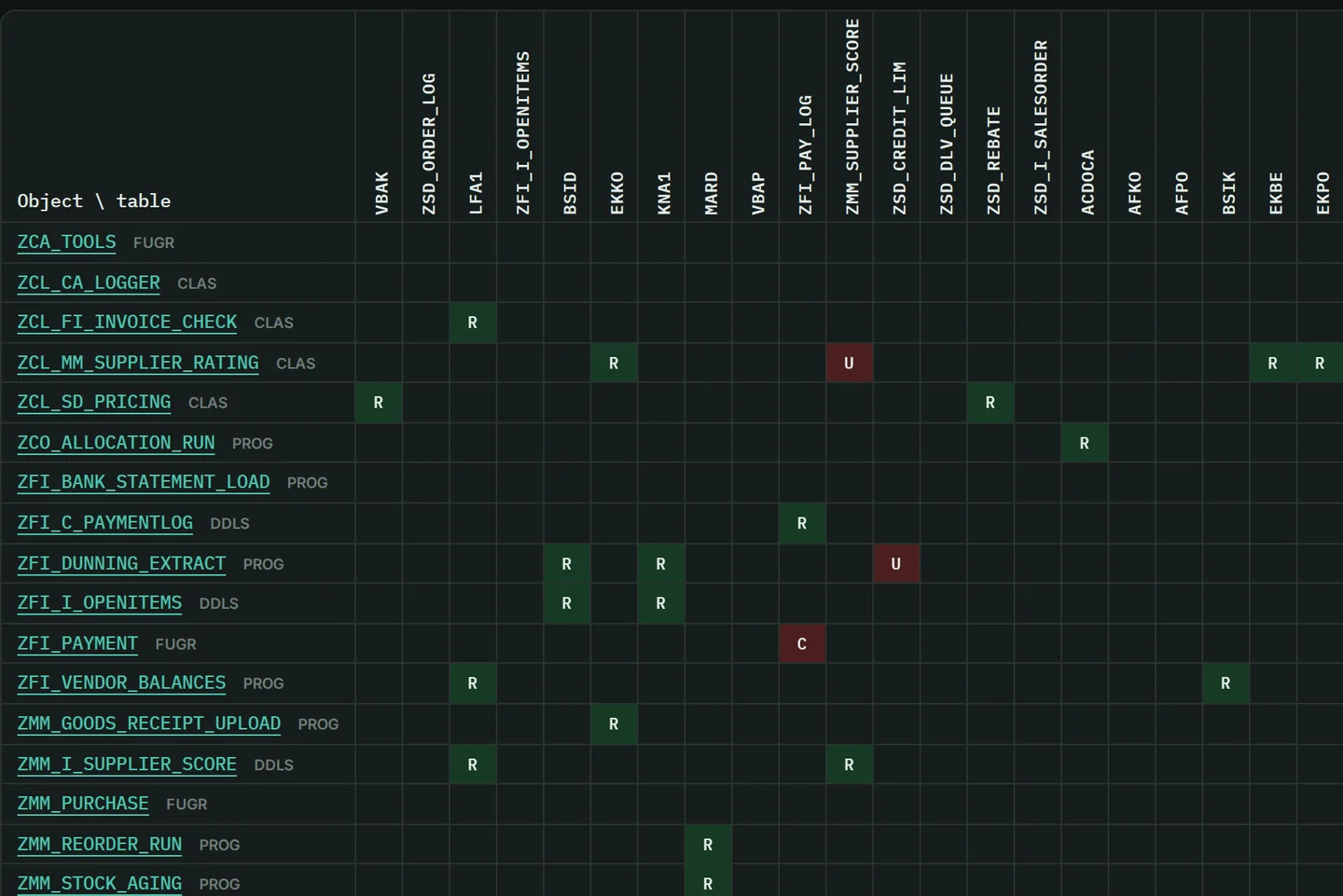
Data usage. C, R, U or D in a cell when an object inserts, reads, updates or deletes that table. Screens from a synthetic demo system. Data usage, table by table
A matrix shows which custom code inserts, reads, updates or deletes each table, with a click through to the exact code lines. In our synthetic demo system, the page of table ZSD_ORDER_LOG lists seven database statements: two inserts, four reads and one update.

Interfaces and channels
Channels grouped by what they do: what leaves the SAP system, what runs later, what posts into SAP standard and where coupling is hidden. Classified as IDoc, RFC, BAPI, batch input, update task, HTTP, file, shared memory, payment and BAdI, each with the number of custom objects that use it.

Validation and sign-off
A process document (Validation Package) describes one process end to end in eight fixed sections. Three automated gates run before your expert sees it, and none can be skipped or waived. Your subject-matter expert confirms the points marked SME-REVIEW-REQUIRED and signs off, which publishes it.
07How it works
From one read-only report to documentation your teams can check.
Four steps. Each one produces something you can open and inspect.
- ExportOne read-only ABAP report, installed as a local object in about 5 minutes, with no transport. It reads code, dictionary definitions and configuration, and no transactional data or user names.
- Evidence graphEvery relationship stores file, line and confidence, and is labeled with how it was established. What cannot be resolved is listed, not forced into the graph.
- VerifyA graph verifier replays every relationship against its source line or exported row. A deterministic citation auditor re-checks every tag. No AI in this step.
- Document and confirmThe catalogue and the process map are generated without AI and served in a web app in English, Spanish and Portuguese. Process documents follow, written with AI only under your recorded authorization and published when your expert signs off.
Pilot
1 day from export to documentation4
- 4
“1 day” covers export to documentation; process documents take longer. It covers the evidence graph, the catalogue and the web app. Validation Packages need AI runs and expert sign-off.
08Who it is for
What each team gets.
Business
Process owner
Your process described end to end in a process document, with the open questions marked for you. Your sign-off publishes it.
Functional analyst
What starts each process, which tables it reads and changes and which interfaces it reaches, each with its evidence. Ask AI answers questions in plain language, with numbered evidence.
Audit and compliance
Which code writes to payment and finance tables, which authorization objects it checks and which interfaces exist, each with its citation.
SAP S/4HANA transformation lead
An inventory by business area and by process: what exists, how it runs and what it depends on, so the remediation scope rests on data.
IT
SAP CoE and IT lead
Every custom object inventoried, a coverage register that counts what was documented against what was exported, and a re-verified rebuild after each new export.
ABAP developer and AMS team
Where-used in both directions, call trees, entry points and the impact of a change, each down to the cited line. Handover documentation that can be verified.

Three moments when everyone needs the same facts.
SAP S/4HANA and clean core
What exists, how it runs and what it depends on: a smaller remediation scope, and decisions based on data.
AMS handover
The handover documentation already exists and can be verified, so an incoming provider can check what it takes over.
Audit and compliance
Which code writes to payment and finance tables, which authorizations it checks, which interfaces exist. For readers outside your company, such as external auditors, the source viewer can redact names and user IDs.
These benefits are qualitative. We have not measured them in percentages, hours or return on investment.
See all five use cases09Security & data
Read-only by design. AI only with your authorization.
For your security and data-protection teams, stated plainly. No badges we do not hold.
Security & data, in fullRead-only export
One ABAP report, installed as a local object with no transport. It contains no database INSERT, UPDATE, MODIFY, DELETE or COMMIT, and needs display authorizations plus permission to write its export files.
No transactional data, no user names
It reads code, dictionary definitions and configuration, never orders, invoices or postings. Author, changed-by and every other user-name column are removed.
AI only with your recorded authorization
The graph, the catalogue and the process map are built without AI. Process documents and Ask AI run only with your explicit, recorded authorization; Ask AI is off by default. Before any AI step, personal data in comments and strings is redacted.
Sign-in required
Every page and API of the web app requires sign-in. Accounts are created by an administrator; there is no self-registration.

10Languages
Documentation in English, Spanish and Portuguese.
The web app and the catalogue come in English, Spanish and Portuguese, and so do demos and support.
- SAP object names and code, table and field names, citation tags and texts exported from SAP are never translated.
- Process documents are written and gated in English. The Spanish version is a machine translation, marked verified only after every citation, code span, number and table is confirmed unchanged and a reviewer model checks the meaning.

11FAQ
Questions to ask before you start.
Is this process mining?
No. CodeGraphAI for SAP never reads orders, invoices or postings, so it does not show how many orders run through a process or how long they take. It documents how your system is built to run each process: what starts it, what its code does, and which tables and interfaces it touches. Every factual line is cited.
Does it document SAP standard, or only what we built?
What you built around SAP standard: your custom code and the configuration, transactions, screens and jobs that start or connect it. It also records the definitions of the SAP tables your code uses and, from the SAP where-used index, the SAP code that calls yours. Calls into SAP function modules and BAPIs are shown; what they do inside is not. It never reads SAP standard source code, except the user-exit includes you list on the selection screen.
Who decides what a process means?
Your experts. The catalogue states what the code and the configuration do and where, never business purpose, and the process map is labeled as a proposal. A process document is published only after your subject-matter expert confirms the points marked SME-REVIEW-REQUIRED and signs off.
What does the export read, and what leaves our system?
Your custom source code, ABAP Dictionary definitions (structure, not table contents), the SAP where-used index, transactions, screens, background jobs and process configuration such as IDoc, payment and DMEE, BAdI and CMOD. No transactional data and no user names. You hand over the export archive for analysis. AI steps send code facts and redacted source excerpts to external AI providers (OpenAI or Anthropic), and only with your recorded authorization. For hosting and retention, ask us.
How long does it take?
Installing the export report takes about 5 minutes. In the pilot, on a productive SAP S/4HANA system, it took 1 day from export to documentation: the evidence graph, the catalogue and the web app. Process documents take longer, because they need AI runs and your expert’s sign-off.
How does the documentation stay current?
There is no live connection to SAP. After a release you run the export again. The new documentation is built and verified separately, in each language, before it goes live; the previous version is archived and can be rolled back. User accounts, approvals and process documents are kept; a regenerated process document must pass the gates again.

Bring your questions about how your processes run.
A guided demo with our team: the web app, the evidence graph and a cited catalogue page on our synthetic demo system, then your questions. About 30 to 45 minutes, in English, Spanish or Portuguese. We reply by email to schedule it.
or write to hello@codegraphai.com